
In many businesses that use SharePoint, the answer to a staff question is already there somewhere. The problem is finding it. People search by file name, open three versions of the same procedure, and then ask a colleague anyway. AI agents can answer those questions, but only if people actually use them. An agent that lives in a separate app is easy to forget.
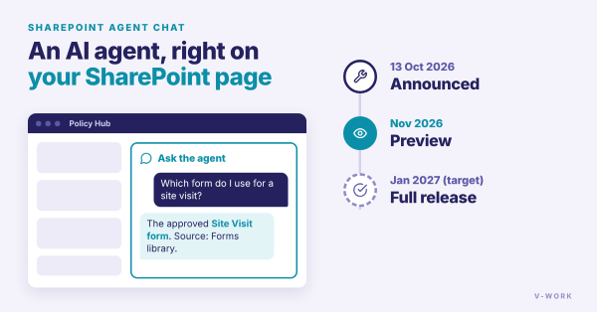
Microsoft has now announced a way to put the agent on the page people already visit. On 13 October 2026, Microsoft added a new SharePoint feature to its Microsoft 365 Roadmap: the "Agent chat" web part, currently listed as "In development". Page editors will be able to add the web part to a modern SharePoint page and point it at any Microsoft 365 Copilot agent. Staff can then ask the agent questions directly on that page. (Microsoft 365 Roadmap 575298)
This feature is not available yet. The roadmap lists a preview in November 2026 and general availability targeted for January 2027. Roadmap dates can change, so treat them as a plan, not a promise. Microsoft has not yet said which licenses the web part will need.
Why this matters
Think of a policy hub, a quality manual site or an operations library. Today, the home page shows links and news. With this web part, the same page can also hold an agent that answers "Which form do I use for a site visit?" from the approved documents in that library. People do not need to install anything or learn a new place to go.
The web part is only the front door, though. Whether the answers are right depends on three things you can prepare now, before the preview arrives.
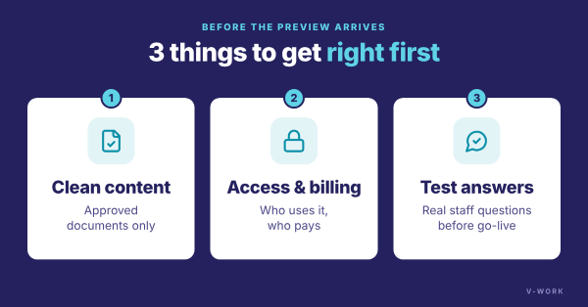
1. Make sure the agent reads the right documents
An agent is only as good as the content behind it. If drafts, old versions and approved documents sit side by side, the agent may quote the wrong one. General availability of Copilot in SharePoint began rolling out on 30 September 2026. It can fill library columns automatically from document content, so documents are tagged by type, status or owner without manual typing. (Get started with Copilot in SharePoint (Microsoft Learn); Create autofill columns (Microsoft Learn)) Copilot in SharePoint needs a Microsoft 365 Copilot license, and basic autofill is included with it. Faster, site-wide "Advanced Autofill" uses Copilot Credits (Microsoft's pay-per-use units) and only works after an admin turns on usage-based billing. Clear status columns make it much easier to keep drafts out of the answers.
2. Decide who can use it, and how it is billed
This step is easy to skip. People with a Microsoft 365 Copilot license can use agents at no extra charge. For people without that license, agents that read shared company data such as SharePoint generate usage charges in Copilot Credits. (Plan licensing and cost for agents (Microsoft Learn)) The billing setup is also changing. Microsoft is retiring the older SharePoint agents saved as ".agent" files, which stop working after March 2027. The SharePoint agents pay-as-you-go setup applies only to those files. New and upgraded agents follow the Copilot app model, where use by people without a license is billed through Copilot app pay-as-you-go. (Upgrade agents in SharePoint and OneDrive (Microsoft Learn)) Putting an agent on a busy home page could therefore change your monthly bill. Agree on who should see it, and set a budget, before you publish the page.
3. Test the answers before go-live
Microsoft's own reference design for agents that answer from approved knowledge recommends grounding answers in approved articles, citing the source, sending sensitive topics to a person, and measuring answer quality with the evaluation features in Copilot Studio before each release. (Multi-agent reference architecture (Microsoft Learn)) A short set of real staff questions, checked by the document owners, is enough to start.
A simple checklist for the next three months
- Choose one site where staff ask the same questions again and again.
- Clean up its library: archive old versions, and add a status column (for example, Draft or Approved).
- Decide who will use the agent, and whether they have Microsoft 365 Copilot licenses or need pay-as-you-go billing.
- Build the agent with Copilot Agent Builder (Microsoft says it arrives in mid-November 2026), not as a .agent file, on approved documents only, and test it with 20 real questions.
- When the preview arrives, try the Agent chat web part on that site's home page with a small group first, and watch usage for a month.
How V-Work can help
V-Work designs and supports SharePoint document management systems for businesses in Malaysia. Our AI-ready document library setup covers library clean-up, automatic tagging with Copilot in SharePoint, and answer testing. If you want an AI solution in Malaysia but are not sure where to start, our AI readiness assessment looks at your content, licenses and risks first. Contact us to plan a pilot before the preview arrives.