
 Nurhidayah Mahmood
Imagine this. A new admin executive joins a Malaysian manufacturing company. On her second day, she tries Microsoft Copilot, the AI assistant built into Microsoft 365, and types a simple question: “What were our staff bonuses last year?”
She expects nothing. Instead, Copilot gives her a neat summary, taken from an old HR spreadsheet that someone shared with “everyone in the company” three years ago and then forgot about.
Nobody hacked anything, and Copilot didn’t break any rules. It did exactly what it was built to do.
More Malaysian companies are now adopting AI at work. Many are looking for an AI solution in Malaysia that is safe, practical and quick to set up. This is the risk most of them don’t see coming.
Copilot only shows what you already have access to
Microsoft is clear that Copilot only uses data a person is already allowed to access. It follows your existing permissions to the letter.
That sounds safe, and in a well-organized company it is. The problem is that most companies aren’t as tidy as they think.
Over the years, files pile up in SharePoint, Teams and OneDrive. Someone shares a folder with the whole company “just for now.” A project ends, but the site stays open. A staff member leaves, and nobody owns their files anymore. Microsoft itself notes that SharePoint’s sharing settings start at the most open option unless someone changes them.
Before AI, this didn’t matter much, because the files were hard to find. Copilot changes that. It searches everything a person can open, in seconds.
Your files were always open. AI just made them easy to find.
What could be exposed in a typical Malaysian company
Think about what sits in your SharePoint today:
- Contracts: supplier agreements, pricing terms and renewal dates, often sitting in shared folders anyone can open.
- Tender documents: bid prices and evaluation scores. For companies that bid for government or GLC projects, a leaked tender file is a serious problem.
- Vendor and procurement records: supplier bank details, quotations and purchase approvals.
- Customer data: names, IC numbers and phone numbers exported from your CRM, such as Microsoft Dynamics 365 CRM, into spreadsheets that end up shared too widely.
- HR files: salaries, payslips and staff records.
Whether this data sits in SharePoint, a contract or tender management system, or eProcurement software, the rule is the same: only the right people should see it.
The warning signs
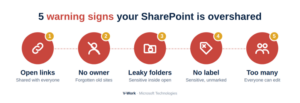
Microsoft lists several signals that a company has an oversharing problem. You’re at risk if any of these sound familiar:
- Files or folders shared with “Everyone” or “Anyone with the link.”
- Old SharePoint sites with no owner.
- Sensitive folders sitting inside open sites, which become open too.
- Sensitive files with no “confidential” label.
- Sites where the whole company can edit, when only a few people need to.
Why this matters more in Malaysia now
Malaysia’s Personal Data Protection Act (PDPA) was updated in 2024. Since 1 June 2025, many businesses must appoint a Data Protection Officer. They must also report a personal data breach to the Commissioner within 72 hours, and tell affected people within seven days if they’re likely to suffer significant harm.
If Copilot shows customer or staff data to the wrong person, that could become a PDPA issue. “The AI showed it to them” is not an excuse anyone wants to give.
At the same time, Microsoft began rolling out Copilot in SharePoint and OneDrive on 30 September 2026. Many more Malaysian companies will switch it on in the coming months.
Five steps to protect your business
Good SharePoint document management in Malaysia starts with these five steps. Microsoft already has the tools, though some come with specific licenses (see the note below the steps).
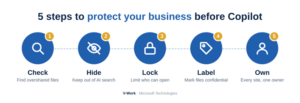
- Find out what’s overshared. SharePoint has reports that show which sites are shared too widely. Start there, not with guesswork.
- Hide your most sensitive sites from AI search. A setting called Restricted Content Discovery stops a site’s content from showing up in Copilot answers for people who haven’t used it recently, without changing who can open it.
- Lock down the sites that really matter. For HR, finance, legal and procurement, limit access to a named group of people only.
- Label your sensitive files. Sensitivity labels mark files as confidential and control how they can be used, including by AI.
- Give every site an owner, and archive what’s dead. If nobody owns a site, nobody is checking who can see it.
A note on licenses: the oversharing reports come with Microsoft 365 Copilot licenses or the SharePoint Advanced Management add-on. Restricted Content Discovery needs a Copilot license. Sensitivity labels need Microsoft 365 Business Premium, E3 or higher. Check which plan your company has before you start.
None of this slows AI down. It makes sure the AI gives the right answers to the right people.
Final thoughts
AI is coming to every Malaysian workplace, and that’s a good thing. Copilot can save your team a lot of time. But it can only be as safe as the files it can see.
The companies that get the most from AI aren’t the ones that switch it on first. They’re the ones that tidy up first. Start with one simple question: if a new staff member asked Copilot about salaries, contracts or tender prices today, what would it find?
If you’re not sure of the answer, now is the right time to check, before someone else finds out for you.