License changes rarely make headlines, but they often decide which features a sales team can use. Microsoft has announced one that Dynamics 365 Sales customers in Malaysia and elsewhere should put on their renewal calendar now.
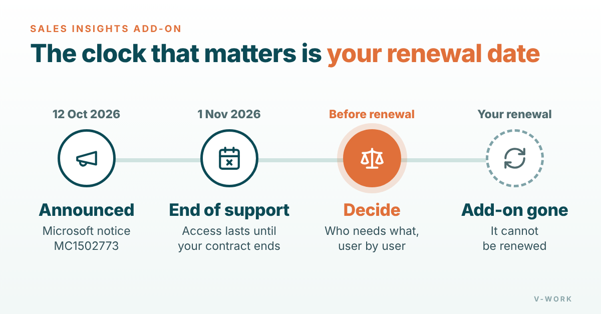
On 12 October 2026, Microsoft published Message center notice MC1502773. It says the Dynamics 365 Sales Insights standalone add-on reaches end of support on 1 November 2026. Microsoft describes Sales Insights as "a legacy offering whose capabilities are already included in Sales Premium", and says the change is meant to reduce licensing complexity. (Message center MC1502773 (public copy))
What changes, and when
- If you hold the add-on today, nothing stops on 1 November. Microsoft says access continues until your current contract term ends.
- At your next renewal, the Sales Insights add-on is no longer available.
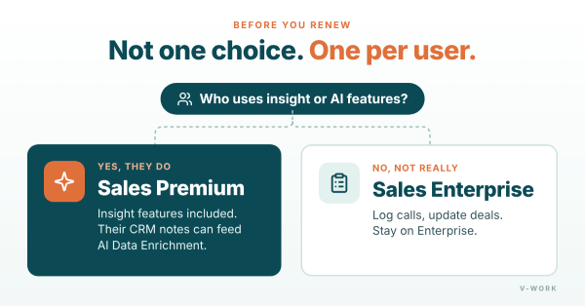
- If your team needs those capabilities, Microsoft's route is Dynamics 365 Sales Premium. Microsoft says Sales Premium is priced the same as Sales Enterprise plus Sales Insights, and that it also includes Copilot Credits, more Dataverse storage and new Sales Premium capabilities. Microsoft has not published the Copilot Credit or storage amounts.
- If your team does not use them, you can stay on Sales Enterprise.
Pricing depends on your own agreement, so confirm the numbers with your Microsoft account team or licensing partner. (Message center MC1502773 (public copy))
Why this is also an AI decision
The license a seller holds now affects which AI features work with their data. For example, Microsoft is rolling out a change to AI-powered Data Enrichment in Dynamics 365 Sales. Admins will be able to choose which sources it uses: Outlook emails, Teams meetings or notes written in the CRM. Turning on CRM notes does not need company-wide admin consent, but only notes from users with a Dynamics 365 Sales Premium license are used. For organizations already using Data Enrichment, the CRM notes option starts switched off. For new organizations, it starts switched on. (Microsoft 365 Roadmap 574364)
Picture a sales team where managers rely on insight features every week, while most sellers only log calls and update opportunities. A single company-wide choice would either overpay for the sellers or take features away from the managers. Deciding by role avoids both. The same thinking applies to AI: give the license that unlocks an AI feature to the people whose notes and records that feature will actually use.
So the renewal question is not only "do we still need Sales Insights?". It is also "which of our sellers should have access to the AI features we want to use next?".
Five steps to take before your renewal
- Find your renewal date. This sets your real deadline.
- List who uses Sales Insights features today. Microsoft recommends identifying these users first. Ask team leaders, not only IT, because sellers often rely on features without knowing which license provides them.
- List the AI features you plan to use in the next year, such as Data Enrichment from CRM notes, and check which license each one needs.
- Compare two options: moving some or all users to Sales Premium, or staying on Sales Enterprise. Decide user by user, not for the whole company.
- Confirm pricing under your agreement and plan the license change before the renewal date, so nobody loses a feature they depend on.
What not to do
Do not wait for the renewal quote to start this review. By then there is little time to test, and the default choice is usually to renew what you had, which is no longer possible here. Also, do not move everyone to a higher license "just in case". A short review of who uses what usually shows that only some roles need the extra capabilities.
How V-Work can help
V-Work implements and supports Microsoft Dynamics 365 CRM for businesses in Malaysia, including Dynamics 365 Sales. We can review how your team uses Sales Insights features today, map the AI features you plan to adopt to the licenses they need, and plan the change with you before your renewal. Your Microsoft account team or licensing partner confirms the final pricing. Contact us to book a license and AI review.