
Imagine a sales assistant that never sleeps. It researches every prospect on your list, writes a personal email to each one, follows up, and marks who is interested. That is the promise of Microsoft's Sales Development Agent.
Now imagine that assistant is paid by usage, and nobody set a budget. From 1 December 2026, that is the situation for any company that turns the agent on without a spending limit.
What the agent does
The Sales Development Agent works in Microsoft Teams. You give it a list of prospects, or connect it to your CRM. For each prospect, it searches public information on the web, combines it with your product information, and writes outreach emails based on your playbook. (Microsoft Learn)
It can also connect to Dynamics 365. When a prospect replies with interest, the agent marks the lead as qualified and passes it to its manager. When a prospect is not interested, it marks the lead as disqualified. (Microsoft Learn) For companies using Microsoft Dynamics 365 Sales in Malaysia, that means the agent can update your sales pipeline on its own.
Who can use it
The agent needs Microsoft 365, Microsoft 365 Copilot and Teams licenses. It can connect to Dynamics 365 Sales. Today it is open only to organizations in Microsoft's Targeted release program, which gives early access to new features. (Microsoft Learn)
What changes on 1 December 2026
Microsoft updated its Message center notice MC1492151 on 11 November 2026. It says:
- From 1 December 2026, the Sales Development Agent is billed on usage, through Copilot Credits.
- Until then, the agent needs Microsoft's Frontier early-access program.
- The agent is still in public preview.
- Microsoft will share consumption estimates "closer to the transition date".
Microsoft's advice to admins is clear: set spending policies for AI experiences before 1 December 2026. Microsoft adds: "No action is required unless your organization plans to deploy or continue using these capabilities." (Message center MC1492151)
Why this needs attention now
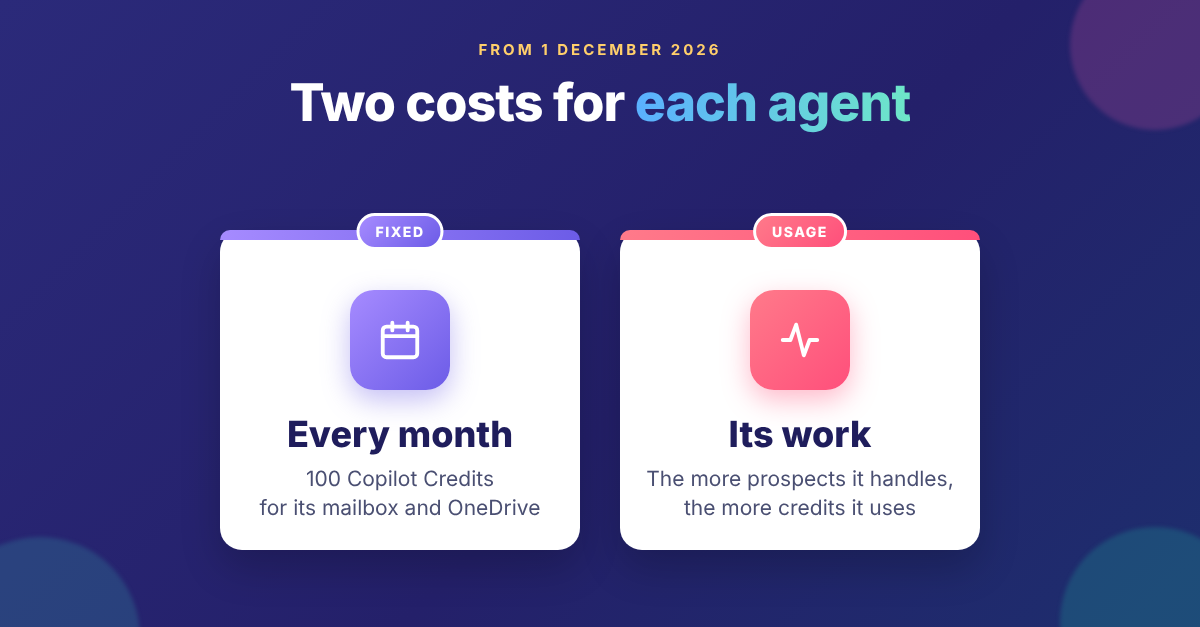
An agent that works on its own also spends on its own. Because billing is based on usage, the more prospects the agent handles, the more credits it uses. Microsoft has not yet published how many credits a typical task uses. So the safest plan is a firm limit, set before anyone presses "go".
There is also a fixed monthly cost. Each Sales Development Agent gets its own account, mailbox and OneDrive. Microsoft charges 100 Copilot Credits per agent each month for these, even before the agent does any work. Everything the agent does is billed on top. (Microsoft Learn)
There is one more detail that is easy to miss. In the Microsoft 365 admin center, Copilot spending policies have a setting called "Auto-apply new services". It is on by default. When it is on, newly supported Copilot agents and services are added to the policy automatically. (Microsoft Learn) If you already have a policy for other Copilot services, check what it will cover after 1 December.
Two questions for Malaysian sales teams
- Which language will it write in? Microsoft lists 22 languages for outreach, including English, Chinese (Simplified) and Thai. Bahasa Melayu is not on the list today. If your prospects expect Malay, test this first. (Microsoft Learn)
- Where is your data processed? Microsoft says some data may be processed outside your selected region when local capacity is not available, and the agent may use models from other providers. Check this against your company's data policy before you install it.
Five steps before 1 December
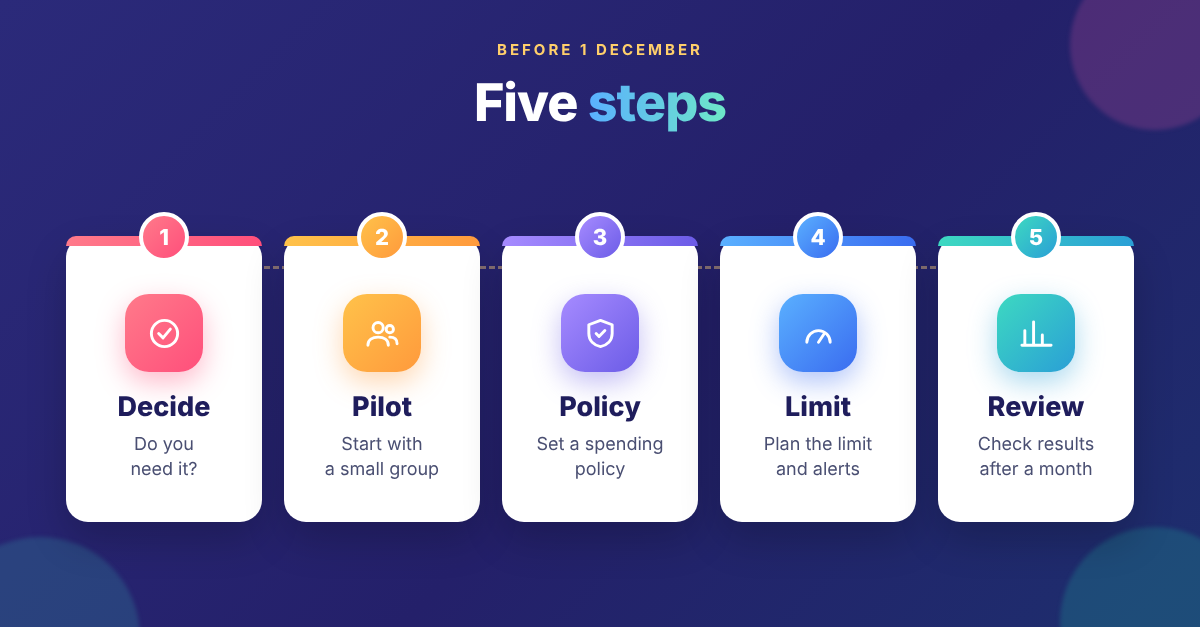
- Decide if you need it. If no team plans to use the agent, don't activate it.
- Choose who can create it. Admins can limit which users or groups create agent instances. Start with a small pilot group. Every agent instance adds its own monthly charge. (Microsoft Learn)
- Set a spending policy. Microsoft asks admins to do this before 1 December, but it has not yet said exactly where this agent's spending will be managed. Ask your Microsoft partner, or watch notice MC1492151 for the update.
- Plan the limit. For Copilot spending policies, Microsoft sets a minimum monthly limit per user, so plan the size of your pilot group with that in mind. (Microsoft Learn) Turn on alerts so the right people get an email when spending reaches a set level.
- Review after one month. Compare credits used with qualified leads produced. Then decide whether to grow, adjust or stop.
What happens when the limit is reached
With a Copilot spending policy, users who reach their monthly limit lose access to the agents and services in that policy until credits reset on the first of the month. (Microsoft Learn) Tell your sales team in advance so the pause doesn't catch them mid-campaign.
The bottom line
AI prospecting can save sellers hours every week. But an agent with no budget is like a corporate card with no limit. Set the limit first, run a small pilot, and let the results decide the next step.
V-Work implements and supports Microsoft Dynamics 365 CRM in Malaysia, including Dynamics 365 Sales. If you would like help reviewing your AI agents and Copilot Credit spending before 1 December, talk to V-Work.